
Meta
Meta Pakistan: Buy Original VR Headsets & Smart Glasses at FonePro
Meta in Pakistan: FonePro offers genuine Meta virtual reality gear, smart glasses, and official accessories. Shopping our Meta Pakistan catalog at FonePro ensures 100% factory-sealed items, local product warranty coverage, and fast nationwide delivery.
Explore Our Lineup of Original Meta Products in Pakistan
Whether you want to dive into 3D gaming with a standalone VR headset or record high-definition content on the go with smart eyewear, our inventory covers Meta’s flagship releases.
Meta Quest VR Headsets in Pakistan.
Step into standalone virtual reality without needing a bulky gaming PC or external sensors. Meta Quest headsets combine sharp displays, intuitive motion controllers, and mixed-reality capabilities for gaming, fitness, and virtual workspaces.
- Meta Quest 3
- Meta Quest 3S
- Meta Quest 2
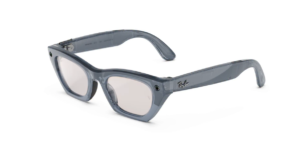
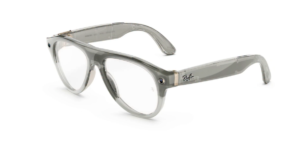
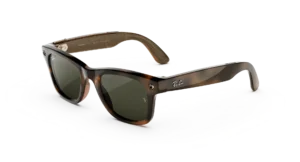
RayBan Meta Smart Glasses in Pakistan
Combine iconic frame styles with hands-free technology. Ray-Ban Meta Smart Glasses let you capture photos, record video, listen to audio, and take phone calls directly from your eyewear.
- Wayfarer & Headliner Frames
- Open-Ear Audio & Microphones
- Portable Charging Case
Official Meta Accessories and Upgrades
Maximize comfort, battery life, and convenience with genuine add-ons designed specifically for Meta hardware.
- Elite Straps & Battery Straps
- Charging Docks & Mounts
- Carrying Cases
Why Buy Meta Products from FonePro Pakistan?
Ordering high-end tech online requires trust. Here is why tech enthusiasts across Pakistan choose FonePro:
- 100% Guaranteed Authentic Stock
- 7-Day Local Check Warranty
- Exclusive Bank Transfer Savings
- Nationwide Fast Delivery
- Cash on Delivery (COD) Options
Frequently Asked Questions About Meta in Pakistan
Do Meta Quest headsets require a gaming PC to work?
No. Meta Quest headsets (including Quest 3 and Quest 3S) are standalone devices. They run on their own built-in operating system and download games directly over Wi-Fi. However, you can also connect them to a PC using a Link cable or AirLink to play PC VR games if desired.
How do Ray-Ban Meta Smart Glasses connect to your phone?
They pair with your iOS or Android smartphone via Bluetooth and the Meta app. This allows you to transfer photos and videos, manage audio settings, and update firmware smoothly.
How long does shipping take for Meta products ordered on FonePro?
Standard shipping takes 2 to 4 working days for major urban centers like Lahore, Karachi, and Islamabad, with tracking details sent as soon as your order dispatches.

Showing all 7 resultsSorted by latest
- ₨0.00 Get notified This product has multiple variants. The options may be chosen on the product page
- Price range: ₨0.00 through ₨189,999.00 Get notified This product has multiple variants. The options may be chosen on the product page
- ₨0.00 Get notified This product has multiple variants. The options may be chosen on the product page
- Original price was: ₨449,999.00.₨389,999.00Current price is: ₨389,999.00. Get notified This product has multiple variants. The options may be chosen on the product page
- Price range: ₨91,999.00 through ₨138,999.00 Get notified This product has multiple variants. The options may be chosen on the product page
- Price range: ₨129,999.00 through ₨174,999.00 Get notified This product has multiple variants. The options may be chosen on the product page


Showing all 7 resultsSorted by latest
FAQs
Why is my Meta Quest 3/3S controller drifting or losing tracking?
Controller tracking loss or joystick drift is usually caused by dirty infrared sensors, low battery voltage, or LED/IR interference from room lighting, which can be fixed by cleaning the tracking rings, re-pairing in the Meta Horizon app, or recalibrating deadzones.
How do I fix a black screen or boot loop on my Meta Quest headset?
A black screen after a software update is often resolved by holding the Power and Volume Down (-) buttons simultaneously for 30 seconds to open the USB Update Mode bootloader menu and selecting "Boot Device" or "Factory Reset."
Why are my Meta Quest lenses blurry or out of focus?
Blurriness on the Quest 3S is caused by improper IPD (interpupillary distance) adjustment or using fresnel lenses outside the optical sweet spot, whereas on the Quest 3, cleaning the pancake lenses with a dry microfiber cloth and adjusting frame positioning corrects it.
Why does my Meta Quest battery drain quickly even when turned off?
Rapid battery drain is typically caused by Auto-Wake sensors being triggered inside a storage case; turning off "Auto-Wake" in Display Settings or fully shutting down instead of using Sleep Mode prevents power draw.
How do I fix Ray-Ban Meta glasses not pairing or failing to connect to Bluetooth?
If your glasses fail to pair, wipe the metallic charging contacts inside the case with isopropyl alcohol, press and hold the case catch button for 5 seconds until the LED flashes blue, and re-bind through the Meta View app.
Why did the camera or AI stop working on my Ray-Ban Meta smart glasses?
Meta automatically disables camera features if the frame's privacy LED light is covered, tampered with, or obstructed, requiring you to clear the LED sensor to restore photo and video capture.
Why are my Ray-Ban Meta smart glasses not charging in the case?
Charging failures usually stem from sweat or dust buildup on the arm hinges or case pins, which can be resolved by cleaning the contacts thoroughly and using a 5V/2A power adapter.
Can I use Meta Quest headsets while wearing prescription glasses?
Yes, but to prevent permanent lens scratching, use the built-in facial interface depth spacer or install custom magnetic prescription lens inserts available for Quest 3 and 3S.
How do I play PC VR games on my Meta Quest wirelessly in Pakistan?
Connect your PC directly to a Wi-Fi 6 router via Ethernet, ensure your Quest is on the 5GHz/6GHz band, and launch games using Meta AirLink or Virtual Desktop.
How do I claim a check or product warranty for Meta gear bought at FonePro?
You can initiate a warranty claim by contacting FonePro customer support with your purchase receipt or bringing your item to our physical store at Shop G-36, Jeff Heights, Gulberg III, Lahore.